Post Processing – Borders Sunset with Joe Cornish

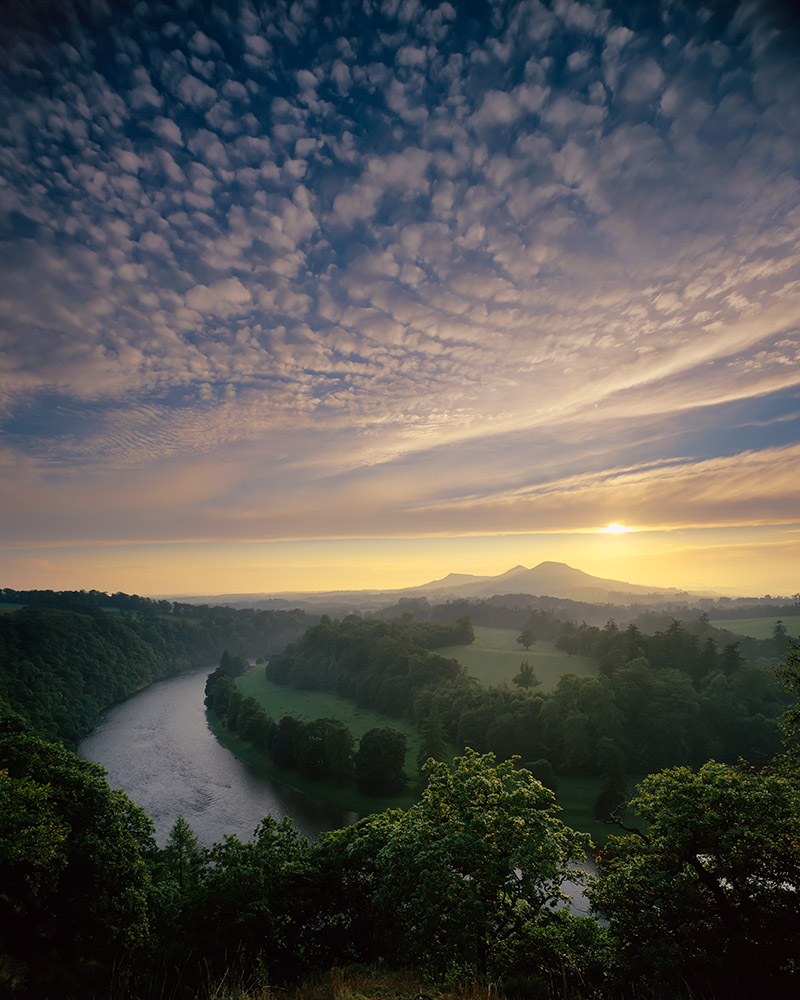
Borders of Scotland

We’re hoping to include a regular column on post processing pictures in photoshop. These series won’t be concentrating on individual techniques (although we will expand on some of these if subscribers ask for more info) but we will be concentrating on how to make pictures work better; How to balance light, emphasise structure and guide the eye. The series starts with a photograph that Joe has had in his archive for some years but that was problematic because of very dark corners in the sky. A drum scan by Tim Parkin created a file that finally allowed the image to be assessed on it’s own merits. The running length is approximately one hour and although the video that appears in the bottom corner is only visible for the first half of the screencast (due to technical problems – in other words Tim made a boo boo). Although this image did not need a great deal of post processing, we hope you get an idea of how Joe approaches the post processing stage. There will be a second small screencast for this image where Joe uses large radius unsharp masking to enhance the texture in the middle area of the picture where the two lone trees appear.

You need to be logged in to see this part of the post
This video is only available to members who have at least a free subscription. You can log in or register for a free subscription here and then return to the page.

29 Responses

  1. the3dge

    Great video, wonderful to see how Joe processed this image and to have his insight and comments was invaluable.

  2. marush

    Great insight into how Joe sees his images and the processing required to get there. I definitely need to get more subtlety into my processing.

    • If you have any pictures you would like us to take a look at, just add a link and we’ll see what we can do (as long as you don’t mind it done in public)

      • MrPhil

        Hi Tim; would be happy for one of my images to “be done” in public. If you want I can mail you a link to the unprocessed RAW file?

        Also, great mag by the way – just what we need.

        Phil

  3. mdr

    Hi Tim,
    Also very happy for one of my images to ‘be done’ in public. Will send you an e-mail with link to two original raws joining into a pano.
    Fantastic magazine. Great effort you (and Joe) are putting into this.
    Cheers,
    marc

    • Send something through Marc.. I’ll see what I can do

  4. Nigel

    It was a real privilege to look over Joe’s shoulder while he did this and to hear his thoughts on the image. The cropping of the image close to the edge of the river and the effect it had on the composition was a revelation to me. Also the brightening of the sky to the top and left and, again, the effect on the composition by extending the “Z” in the image was a real education.

    And, Tim/Joe, what a great idea this is for a website/magazine/webzine or whatever we call it. May it go from strength to strength. It has certainly got off to a good start.

    • Much appreciate the comment Nigel! Hopefully more of this sort of screencast in the future..

  5. MarkWhite

    This is a great thing you guys are doing – looking forward to seeing/reading more – definetly subscribing!

    I was on a workshop with Joe and Chirs Weston last year, and learnt a lot – am hoping this does the same too.

    Got a few images of Rannoch Moor I took last week that I would love to see Joes workflow on (that’s if he doesn’t mind?

    Keep up the good work Joe and Tim :)

    • Ooh – more offerings! I think I may have to set up a flickr group or something like to looks at submissions. Not saying no, just thinking about how to handle lots. Phil Corley’s photo looks very interesting to post process and I think we may do a ‘one photo many photographers’ series to show how interpretations can vary. Thanks Mark! Send me a link to a raw file and we’ll take a look..

  6. Interesting stuff – photographers like Joe are a real insperation and it was fantastic to be able to watch and listen to the best of both world’s “Composition and Processing” something we all thrive to improve on.

  7. I can only get sound but no picture unfortunately. Any help?

    • MarkWhite

      You will need to update you Media Player for this, Mark. It will depend on the format the video was saved in.

  8. candron

    Hi Tim,
    Many thanks for posting Joe’s post-processing and composition videos. Really fascinating stuff, useful of course to the non-UK photographer as well (I’m in Greece).

    Wish you all the best on this endeavor and looking forward to the next issue!

    - Christos

  9. annicariad

    Really informative and interesting video. One tiny gripe….I would have loved to have seen the two images, pre and post, side by side at the end. Thanks, Joe and Tim, I’m off to the studio now to try this on some of my own landscapes!

    Anni.

    • We’ll definitely include a before/after shot. We have a little ‘extra’ on the post processing to show. Joe reviewed the picture prior to printing and decided it need a tweak to open up the detail in the centre of the picture. It uses an unsharp masking technique that is quite interesting (and very useful!). We’ll add the before/after to that article.

  10. rushmeselector

    On the strength of this video alone I will be subscribing. I learnt more in watching this video than many an article (in print or on-line) has taught me. An amazing opportunity to watch someone of Joe’s incredible talent post process and image. Fantastic stuff. More please!

  11. MrP

    Fantastic stuff!
    This is the kind of information that’s going to make a difference to my prints and coming from the Master what more could I ask for. Can’t wait until the next article.

  12. Dave Lawrance

    Yep, great stuff. I thoroughly enjoyed watching both the Joe Cornish videos.
    The only problem for me was the speed of my broadband connection.
    I’m guessing you would probably need a 2 meg connection to watch the videos without stopping. On my .9 meg connection it took me most of the evening to watch them both!

  13. Rob

    Just brilliant – exactly the kind of useful advanced, helpful info that’ll help me improve / give me confidence I might be doing some things right!

  14. A quick comment on the Joe using the Shadow/ Highlight.

    Did he mention that he was using CS3? If so, didn’t Adobe add in the ability to use Shadow/ Highlight as a Smart Filter. Thus, by using this Joe could back and not be tied down to his changes.

    I only have CS2 and it doesn’t have the ability to do it in there. Try this link on it: http://www.adorama.com/alc/article/The-Shadows-Highlights-Adjustment-in-Photoshop

  15. Nigel Roberson

    Hi,
    Great video, done at a nice pace. My only question Tim/Joe is how much had been done at the scanning stage. Was it a linear curve with no capture sharpening etc. Just interested to know where you were starting from.

    • Hi Nigel, the scan was made on a Howtek 4500 drum scanner using Aztek DPL standard software but making two scans – a generic scan which produces a very authentic profiled image and a log scan which heavily boosts he blacks (using hardware tweaks to boost the op amps which process the photomultiplier data). I then combine these two together to give very accurate colours but with a nice extension in the shadows. The scanner was profiled using Hutch colour targets which seems to make a big difference and is processed in Chrome Space (Joseph Holmes). No sharpening was applied in the scanner driver and I use a light capture sharpending from Photokit (4×5 transparency with fine detail). Thanks for the interest!

      • Nigel Roberson

        Thanks for that info Tim. I use a V750 but would like to go to a drum in the future. I like the Photokit sharpening software too. It does all the maths for you that makes the difference between good and bad sharpening, then just applies it.

        Where do you see the videos going in the future. I think this is the main strength of this site. For instance will you cover some field work, filtration, metering, scanning etc ?

        I think I will sign up soon.

        Nigel

  16. Patrick Dixon

    Helped me a lot. Many thanks.

  17. Jim Robertson

    Worth the £52 just to watch this. Best of luck for 2011.

    • Wow! Thanks Jim :-D We’ve got lots more where that came from too. I’ve just filmed an episode on printing with Joe which was very interesting..

  18. Just starting to look at some of the features on LGB for the first time and this is a great piece Tim & Joe. As always when I review such tutorials, I have learnt lots of new techniques and ways of working in Photoshop. Everyone works differently and we are always learning. I certainly did that today and look forward to trying out some of your workflow methods. thanks both

Notify me of followup comments via e-mail. You can also subscribe without commenting.