

Critique – Joe Rainbow

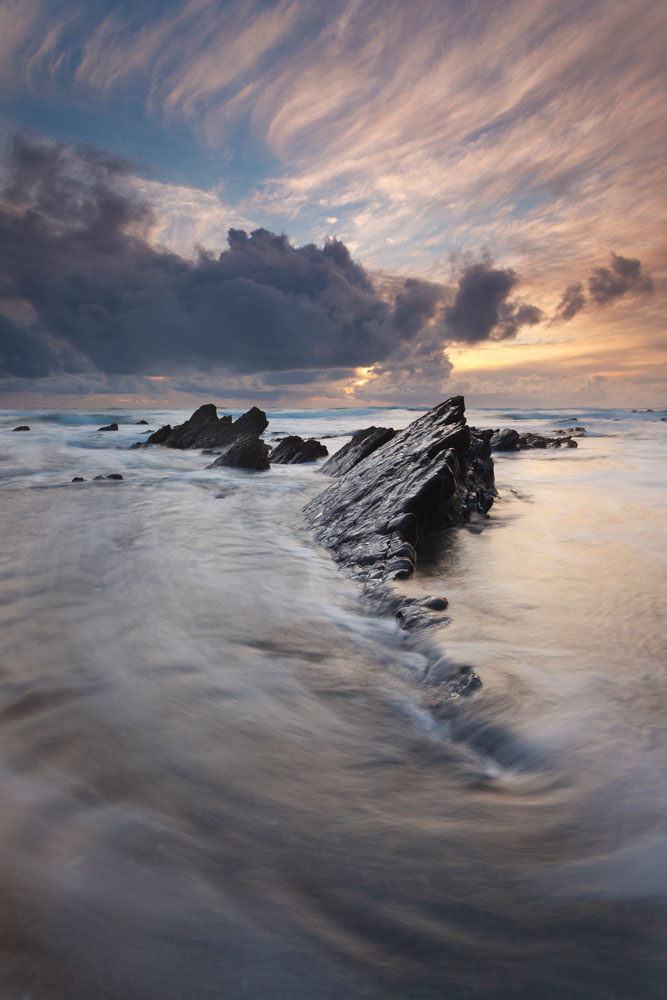
We recently took a look at a fantastic photograph by Joe Rainbow of Gunwalloe Scales and asked Joe Cornish to critique it and also asked him how he would approach the post processing of it. The results, whilst not far from Joe Rainbow’s version, show some interesting aspects of technique and style. The original picture is shown below.
You need to be logged in to see this part of the post

You can see more of Joe Rainbow’s photography at his website Joe Rainbow Photography or at his Flickr stream .

14 Responses

  1. Lovely picture and interesting talk through. My temptation here would be to sneak a bit more definition into the higher clouds and the flowing water. On each side a couple of Lightroom grads with Clarity +100 work nicely. (Tim I’ll send you a reworked PSD if you want)

  2. Joe Rainbow

    Well I am pleased that Joe didn’t find too much that was objectionable. In making this shot, and similar seascapes, the flow of water is so changeable, that obviously you can never capture the same thing twice. I wanted a bit more space to the right, but the cloud was moving that way, I had a comp I was happy with, took a series of shots, and by the time the fg wave movement was just right, the cloud had reached the right hand edge of the frame. I hoped the bottom left flow of water, and the top left ‘flow’ of cloud helped to lessen the desire to see further to the right, and balance the comp more. I agree about the slight imbalance between top and bottom half tonal values, and had to use a harder grad than wanted to hold back a very intense light from the sun. As a result the cloud cover did darken down quite a bit. I have to say, I kept the processing pretty minimal, just a few minor adjustments here and there.
    Johnbeardy, I think I had already added a slight Lightroom grad to lighten the sky already. Thanks for the positive feedback.
    Finally, thanks to Joe for critiquing the image, and being so sensitive to my artistic interpretation. I thoroughly enjoyed seeing the process and agree with the changes made. I think I would have balanced the two smaller clouds to the right slightly by lightening them with the other bigger cloud, also helping to lessen the draw to the right. Otherwise, thanks a lot, much appreciated.
    P.s. I especially liked the two different types of cloud, and for me this was a major reason for pointing the camera that way.

  3. This was an excellent episode. To imagine that Joe’s shot (which I always think are so well constructed, composed and processed) could be improved in such subtle ways, and yet bring about profound changes is food for thought. I too find balancing the an image taken with a graduated filter troubling at times and often run into difficulty trying to balance the light. Enjoyed this immensely.

  4. There was something about this image that I didn’t quite like when I saw it on Joe’s Flickr stream, and I couldn’t quite put my finger on it. Now I’ve looked at it again – seeing both the before and after Joe C’s critique – and I think with the tonal adjustments to the water in the foreground, the image really works.

    It enhances and balances the clouds at the top which otherwise felt a little sharp in comparison to the rest of the original image. Before, I felt those clouds (which are wonderful) were too much of an attention-drawer and I was being taken away from the main event below.

  5. Joe Rainbow, I didn’t mean lightening the sky but using Lightroom/ACR grad filters to bring out more definition. Clarity is a mid tone contrast tool / wide area sharpening. This shows you the technique – http://www.beardsworth.co.uk/downloads/joe_rainbow.jpg. I’ll leave it there for a while.

    • Joe Rainbow

      I have just seen the result of your clarity sliders, and it looks great as far as can be seen from a smallish image. Thanks for your input, much appreciated.

  6. Joe Rainbow

    Tim, I think the image is much more resolved with Joe’s editing, and has a better flow from front to back. That’s why I love this magazine, it gives a real chance for proper feedback instead of flickr style ‘great’.
    Johnbeardy, my mistake, I know exactly what you mean. I occasionally use the clarity tool, but never too much unless the scene is very low contrast. I will have a look at what you did now. Thanks for the advise.
    I use Tony Kuyper’s PS CS5 action plug-ins which allow more subtle and specific control over all tones in an image with seamless selection. I highly recommend them if you haven’t heard of them before. This isn’t an image I used them on, so maybe I should have.

  7. Cracking image Joe and it surely looks like one of those evenings that you look forward to! Anyway, I really like the composition here, and I hear what you say about needing more space to the right (well both Joe’s and Tim for that matter), but I suppose it’s a timely reflection that not every element plays ball and sometimes things just don’t materialise that way that you wanted. Anyway, it’s great to see such an in-depth crit and so sensitively handled. Thanks to all concerned for that…and well done Mr. Rainbow…

    • Joe Rainbow

      Thanks Jason, I really appreciate your feedback.
      I really want to go LF fo rthe aspect ratio as I love 4×5 vert shots for landscape, and the obvious image quality. I also fancy the combination of having a Dslr in the car, just in case the scene is too rapidly unfolding for the 4×5. Now I just need to buy one, work out how to use it, and post the images :)

  8. jennym

    This is a particularly useful video for me, so a big thank you to both Joes and Tim for their contributions. The original shot was fantastic with great depth, loads of energy and a tremendous sky. It was fascinating to see how with quite subtle changes the image could be made even better! I have always wondered how to handle an image where the grad looks a tad heavy, and was interested to see what a difference darkening the foreground water made to the balance of the image. I also noticed that Joe did not suggest a global change to the lighten the sky from the grad line, which is probably what I would have tried! But by lightening the much heavier cloud he has in one move reduced the slight pull to the right and also allowed the foreground rock to leap forward, increasing the depth of the image. Extremely helpful points to ponder. Many thanks again to all.

  9. Well watching that was great fun and very educational too. Indeed, relatively minor adjustments made a substantial difference to the image: lightening the heavy grey storm clouds did help to tidy up the balance and the end result, though only a minor tweak from the excellent original, makes for a better image. I also prefer the slightly darker water. And finally yes, a wider aspect ratio would have been a nice touch to expand the right hand side, but Joe R can be very proud of this image as it is! Thanks and rgds., Adam

  10. Joe Rainbow

    Thank you all for the comments and kind words.
    Large format 4×5 the next step for me I feel. I love that ratio in a vert format, so on the look out for Tachihara or Chamonix cameras :)

  11. Very informative analysis. Love the massive cursor – a good improvement so we can see what Joe is showing us :-) .

  12. As always an excellent and informative critique. Also agree that the target cursor is a good improvement. Wonderful image also Mr Rainbow.

Notify me of followup comments via e-mail. You can also subscribe without commenting.